Currently on Windows. MacOS coming soon—get notified.
HOW Guidy credits work
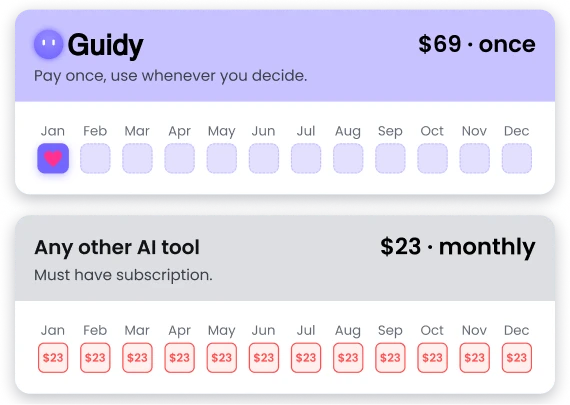
A single $69 purchase unlocks Guidy for life and drops
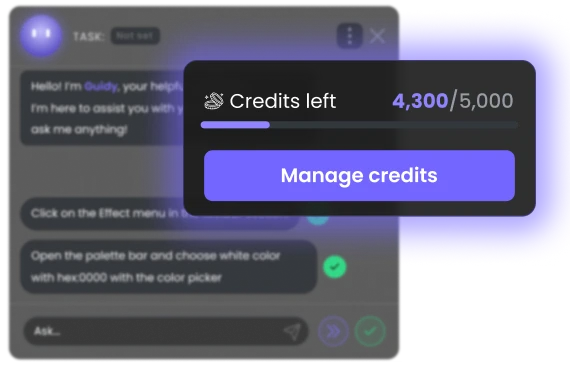
5,000
Credits into your account from day one.
From there, credits move with you. Each action uses a small amount, based on its complexity. Most everyday tasks cost only a few credits. You can see your balance anytime and top up whenever you like.
No subscription. No daily caps. No surprise bills.
How do I access Guidy?
Get started in 4Simple steps
Getting started takes minutes, not hours. Download Guidy, sign in once, and the next time you are stuck just open it and ask.
Guidy is a lightweight AI desktop assistant, built for everyday PC tasks. The download is quick, the file is small, and the app is designed to run without slowing down your computer. Guidy currently works as an AI assistant for Windows.
STEP 2
Install in under a minute
Sign in once and Guidy is ready. It works on top of the tools and websites you already use, from Excel and Outlook to online shops, browser apps, dashboards, and government portals. It acts like an on-screen AI assistant, so you do not have to switch tabs, upload screenshots, or explain everything from scratch.
STEP 3
Type your question
Tell Guidy what you need help with in any language. Ask about a tricky Excel formula, a setting in Outlook, a function in Google Sheets, a paragraph in Word, or a step inside a website. Guidy can work as an AI assistant for Excel, an Excel AI helper, or a general personal AI assistant for PC when you are stuck inside everyday software.
STEP 4
Follow the steps
Guidy shows you exactly where to click and what to do next. It guides you step by step, in real time, inside whatever you already have open. Instead of giving you a long generic answer, Guidy is the AI on-screen assistant that stays with the task as your screen changes.
Security
Your data is PROTECTED
Guidy only reads your screen when you ask it for help, and never stores, watches, or shares what it sees. There’s no background access or quiet data collection.
Encrypted end to end
Anything that travels between Guidy and our servers is fully encrypted from start to finish. Your information never moves unprotected.
Your data stays yours
Guidy never stores, logs, or retains anything from your screen. Every session ends completely clean. Nothing lives on our servers, because nothing is sent there in the first place.
No training on your data
Guidy never uses your screen activity to train any AI model. What you show stays yours, full stop—whether you are using Guidy as an AI for Excel, an AI assistant for Windows, or a real-time guide across other desktop tools.
On when you need it, off when you don't
Guidy only looks at your screen when you open it and ask for help. The moment you close it, nothing is being seen, stored or processed. You stay in control of when your desktop AI assistant is active.
In my professional role as a data scientist, I use a lot of different tooling. Whether it's new tooling like Cloud Code, more traditional IDEs like VS Code, or inevitably the Microsoft Office Suite with Excel and PowerPoint, there's a lot of navigation to remember. For that reason, I like to use Guidy, which with a simple prompt gives you on-screen contextualized annotation navigating you to the setting or the function that you need. It lets you avoid endless hours of scrolling through documentation, watching YouTube videos, or aimlessly clicking around, all in one very simple, very user-friendly interface, all in Guidy.
Katya Mitsanska ·
Hi guys. My name is Kate and I wanna share my experience with you, for one AI tool, Guidy. I started use it recently and, it's honestly one of the most useful AI tools I have tried so far, because what makes it different actually is that it doesn't just tells you what to do, it actually shows you what to do, step-by-step in real time, which is amazing. I use it, mainly for Excel, website development and optimization. I use it a lot for different marketing tasks because my job is actually mainly marketing. I used to waste so much time trying to figure things out on my own or, jumping between very long AI answers, or different tutorials. But now with Guidy, it's actually very, like efficient, super efficient. it's like you learn while you work. So thanks Guidy for making my life easier because it's like you're having a smart assistant the whole time with you.
Ernest Arsena ·
Have you ever logged into one of your regular work applications to do a routine task, only to find they changed the interface of it? Or perhaps you've just started using a new tool for administrative tasks, but you're just so lost and you don't know where to click to start. I handle a ton of admin tasks, and keeping up with changing tools used to be a total headache for me. But I just started using Guidy recently, and it's so far changing everything in how I approach, these tasks. For instance, last week I needed a team room on a brand-new app. I just typed, "Book a ten-person room" into Guidy, and it instantly read my screen and guided me step by step exactly where to click. It felt like having a personal assistant literally looking over my shoulder. So to skip the admin stress like I did, you seriously need to try Guidy
Is there a free version of Guidy I can try before I pay?
Yes. You can do a free download of Guidy and try it on real tasks before you spend a cent. The free trial is not a stripped-down demo, it is the full AI assistant for PC with a limited number of credits, so you can feel how it works inside your own apps. If you have been searching for a free AI assistant for PC just to test the waters, this is the cleanest way to do it. If you like it, $69 unlocks it for life.
How does Guidy’s credit pricing work?
One payment of $69 unlocks Guidy for life. Inside, you spend credits when you ask for guidance. Your purchase comes with 5,000 credits to start, and when you run out you top up with whatever pack size suits you. There is no monthly bill, no auto-renewal, and credits never expire. We picked this model so you only pay for what you actually use, instead of paying every month for a subscription you might forget you have. Guidy is built as an AI productivity tool, not a service that charges you while you are not using it.
How much does one interaction with Guidy cost?
Each action uses a small number of credits, based on how complex the task is. A quick formula tip costs less than a multi-step walkthrough across several windows, but most everyday tasks land in the low single digits. Because the exact cost depends on what Guidy has to do, your live balance is always visible, so you can see what each action used and what is left.
What if I run out of Guidy credits?
Your $69 purchase starts you off with 5,000 credits, which goes a long way for most people. If you do run low, nothing dramatic happens. Whatever Guidy is in the middle of will finish, you do not go into debt, and it simply lets you know your credits have run out. From there, top up with any pack size that suits you and pick right back up where you left off.
Will my Guidy credits expire?
No, your Guidy credits never expire. Use them today, tomorrow, or 10 years from now, they stay in your account until you spend them. There is no countdown, no clock, and no “use it or lose it” rule. Guidy is built to be there when life calls for it, not the other way around.
Do you save screenshots of my screen?
No. Nothing that Guidy sees on your screen gets stored on our end. Guidy only uses what’s visible during your active session to answer your question and that’s it.
How does Guidy process sensitive data such as passwords?
Guidy only looks at your screen when it’s actively assisting you, never in the background. Whatever it does see is encrypted in transit, and never used to train AI models.
What is an AI desktop assistant?
An AI desktop assistant is a piece of AI desktop assistant software that lives on your computer and helps you finish what you are doing inside whatever app or website you have open. Unlike a chatbot in a browser tab, a desktop AI assistant for PC can read your screen, point at what to click, and walk you through real tasks step by step. Guidy is built to be exactly that, a lightweight personal AI assistant for PC that turns into your on-screen helper the moment you open it.
How is Guidy different from Microsoft Copilot or ChatGPT?
Copilot and ChatGPT live in a chat window, so you copy a problem in, read an answer, and switch back to your app to apply it. Guidy stays in your app. It is an on-screen AI assistant that points to the right button, types alongside you, and adjusts if you click somewhere unexpected. For anyone hunting for the best AI assistant for PC that feels less like a chatbot and more like a personal AI assistant for PC, that difference is the whole point.
Which AI assistant is best for Windows 10 and Windows 11?
Microsoft Copilot is the default Windows AI assistant built into Windows 11, but it mostly answers questions in a side panel. Guidy works differently. It is the best AI assistant for PC users who actually want step-by-step guidance, an AI assistant for Windows 10 and AI assistant for Windows 11 that points to what to click on your screen, follows along while you work, and adapts when something does not go to plan. If you want a personal AI assistant for PC that handles real, hands-on help inside any software or website, Guidy is purpose-built.
Can Guidy actually help me with Excel formulas?
Yes, this is one of the things Guidy was built for. Open Excel, ask “how do I write a SUMIFS for this column” or “why is my VLOOKUP returning N/A”, and Guidy points to the exact cell and tells you what to type. If you have ever Googled how to use AI in Excel, this is the easier version. Guidy works as an AI for Excel formulas, an AI for Excel data analysis, an AI assistant for Excel, and a general Excel AI helper, all without leaving your spreadsheet.
Does Guidy work offline, or do I need an internet connection?
Guidy needs an internet connection to talk to its AI brain, so it is not a fully offline AI assistant for PC. The good news, the app itself is a lightweight AI assistant for PC, the data going back and forth is tiny, and nothing from your screen is stored on our servers once your question is answered.
When will Guidy be available on Mac?
Guidy is a Windows-first AI desktop assistant right now, with a Mac version on the way. If you want a heads-up the moment we ship our Mac AI desktop assistant, drop your email here and we will tell you first.